

SaaS roles and permissions UI admins can read without a manual
A roles and permissions screen is the part of a SaaS where an admin decides who can see and change what, and it works only when the admin can tell what a role allows before granting it. When the screen cannot say that, the admin picks the bigger role to be safe from support tickets, and the product ends up with more people able to export, bill and delete than anyone meant.
The person on this screen is rarely the engineer who designed the permission model. It is an office manager adding a new hire, a team lead moving someone between projects, or a founder answering a security questionnaire. They come to it a few times a month, under time pressure, with one person in mind. The screen has to answer one question for them: if I give Dana this role, what can Dana do tomorrow?
Security frameworks have a name for the goal. NIST defines least privilege as granting each user the minimum authorizations needed to do their job. The gap between that and reality is measurable: Microsoft's 2023 State of Cloud Permissions Risks report found that identities use just 1% of the permissions they are granted, across more than 40,000 grantable permissions, over half of them high risk. That study covers cloud platforms, but the mechanism is the same inside a SaaS: when a role cannot be read, it gets granted wide.
The screen before: a matrix that mirrors the code
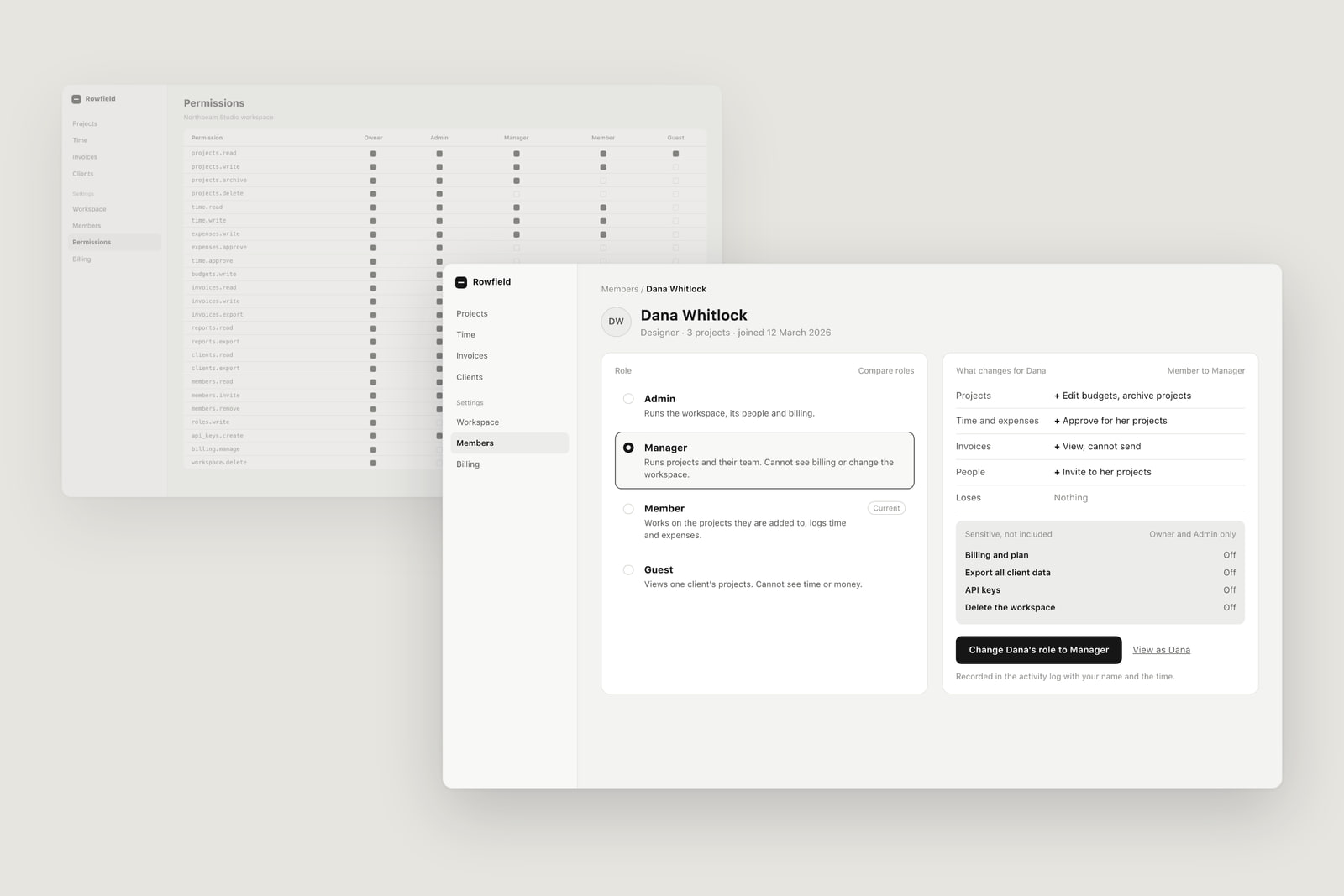
Our example is Rowfield, a project and billing tool for agencies, invented for this article. Its first roles screen is the one a team ships when the permission model comes straight from the database: a settings page called Permissions, with a grid of 24 permission keys down the side and five roles across the top.
- The rows are code.
projects.write,invoices.export,members.invite,workspace.delete. An admin who is not a developer has to guess what each one covers. - The role names say rank, not work. Owner, Admin, Manager, Member, Guest. Nothing says what a Manager does that a Member does not.
- Dangerous rights sit among the harmless ones. Deleting the workspace is one checkbox in the same column as viewing a project.
- The change happens on the role, not the person. To change Dana's access the admin edits the Manager column, which changes it for all 14 Managers at once.
- Save says nothing. No summary of what changes, for whom, and no record of who changed it.
Every one of these is accurate. The grid shows the real model. It just answers the engineer's question (what does each role contain) instead of the admin's (what will this person be able to do).
The screen after, change by change
The remade Rowfield screen opens from a member, Dana Whitlock, and shows what changes if she moves from Member to Manager. Seven changes get it there, in the order an admin meets them.
1. Start from the person
The admin arrives with a name, so the screen starts from the name. Clicking Dana in the member list opens her access: her current role, the projects she belongs to, and the date she joined. Editing a role definition, which changes everyone holding it, moves to a separate page with its own warning. Changing one person and changing a role for everyone are two different decisions, and the old grid made them look like the same click.
2. Name each role after a job, in one line
Each role gets a sentence that says who it is for. GitHub does this in its documentation for repository roles: Triage is recommended for contributors who manage issues and pull requests without write access, Maintain for project managers who need to manage the repository without access to sensitive or destructive actions. Rowfield's Manager reads: "Runs projects and their team. Cannot see billing or change the workspace." The sentence goes on the role picker itself, not in a help page.
3. Group permissions by the work they allow
Twenty-four keys become five groups an admin recognises: Projects, Time and expenses, Invoices, People, Workspace. Inside each group, a role shows a plain verb: can view, can edit, can approve. Stripe describes its custom roles the same way: a role is a set of permissions, grouped into jobs. The keys still exist in code. The admin just never has to read invoices.export to know that a Manager cannot send invoices out of the product.
4. Put sensitive and destructive actions apart
Billing, exporting all client data, managing API keys and deleting the workspace move to a section headed Sensitive, under the groups, each on its own line with what it does in words. They are off by default for every role except Owner and Admin, and turning one on asks for the reason. GitHub draws the same line between Maintain and Admin. The point is that an admin can scan one short list and know who holds the rights that cannot be undone.
5. Show what changes before the save
Before the button, the screen states the difference for this person: Dana gains approve time, edit project budgets, invite people to her projects. Dana loses nothing. If the change takes something away, the screen says what happens to the things that depended on it, such as API keys created under the old role, which stop working. The button says the action in full: "Change Dana's role to Manager". The same diff runs on the server from the same policy that enforces access, so the summary cannot drift from what actually happens.
6. Show the access a person ends up with
When a product lets people hold more than one role, the effective access is what matters. Stripe's documentation states the rule plainly: a user with multiple roles gets all the permissions of each. Rowfield shows that sum as one list, with each right labelled by the role it comes from, and a "View as Dana" link that opens the product with her access, read-only, so the admin can check what she will see before telling her.
7. Write the change down
Under the button: "This change is recorded in the activity log with your name and the time." The log entry keeps who changed it, whose access changed, from which role to which, and when. That record is what an enterprise buyer's security review asks for, and it is what the admin will look for in March when someone asks why Dana could approve invoices.
What the remade screen costs to build
The after screen is more work, and most of the work sits under it. The permission model needs groups and a sensitive flag in code, not only in the interface. The diff in step 5 needs a server endpoint that computes effective access for a proposed change without applying it. The read-only preview in step 6 needs the product to render as another user without that user's session, which touches authentication and is the most expensive of the seven. A first release can ship steps 1 to 5 and 7 and add the preview later.
The labels also need upkeep. Every new permission added to the code must land in a group, with a verb, and be marked sensitive or not. Without a rule in code review for that, the grouped view drifts from the real model in a few months, and a screen that explains access wrongly is worse than a grid that explains nothing.
When the full grid still belongs
The matrix does not disappear. Security reviewers and auditors want every permission against every role in one view, and an enterprise customer building custom roles needs to see the parts. Rowfield keeps the grid one level down, as a read-only table under "Compare roles" with an export, following the two-level pattern we wrote about in progressive disclosure in B2B tools. The admin with one person in mind starts at the person. The reviewer with a checklist starts at the grid. Both read the same model.
Sources
- NIST CSRC Glossary: least privilege
- Infosecurity Magazine: Just 1% of cloud permissions are actively used (Microsoft 2023 State of Cloud Permissions Risks)
- Microsoft: 2023 State of Cloud Permissions Risks report now published
- GitHub Docs: Repository roles for an organization
- Stripe Docs: User roles
- Stripe Docs: Custom roles
Frequently asked questions
Few enough that each one can be described in one sentence an admin understands. GitHub ships six repository roles and Stripe six fixed Dashboard roles, and both write a line for each saying who it is for. If two roles cannot be told apart in that sentence, merge them. If a customer needs something in between, that is the signal for custom roles, not for a seventh built-in one.
Enterprise customers ask for them, usually for jobs like billing admin or auditor that the built-in roles do not fit. Build them on the same permission groups and sensitive flags the built-in roles use, so a custom role reads like the others. Stripe keeps its custom roles in private preview while its six fixed roles cover the common cases, which is a reasonable order: explain the built-in roles first, then open the parts.
No. The interface only mirrors the permission check; the check itself runs on the server for every request, whatever the screen shows. A hidden button stops a confused user, not an API call. The useful rule is that the server policy is the single source: the screen reads its groups, labels and the change summary from it, so what the admin sees and what the server enforces cannot disagree.
Related articles
August 12, 2026 · 7 min read
June 30, 2026 · 7 min read
November 28, 2026 · 8 min read