

Status page best practices, read off Wise during a live incident
A status page is the public page where a product says which of its parts work right now, what has gone wrong, and when it will speak again. For a fintech it is the page a customer opens when money is late, and often the first page a business checks before it calls support. That makes status page best practices a payments problem as much as an infrastructure one.
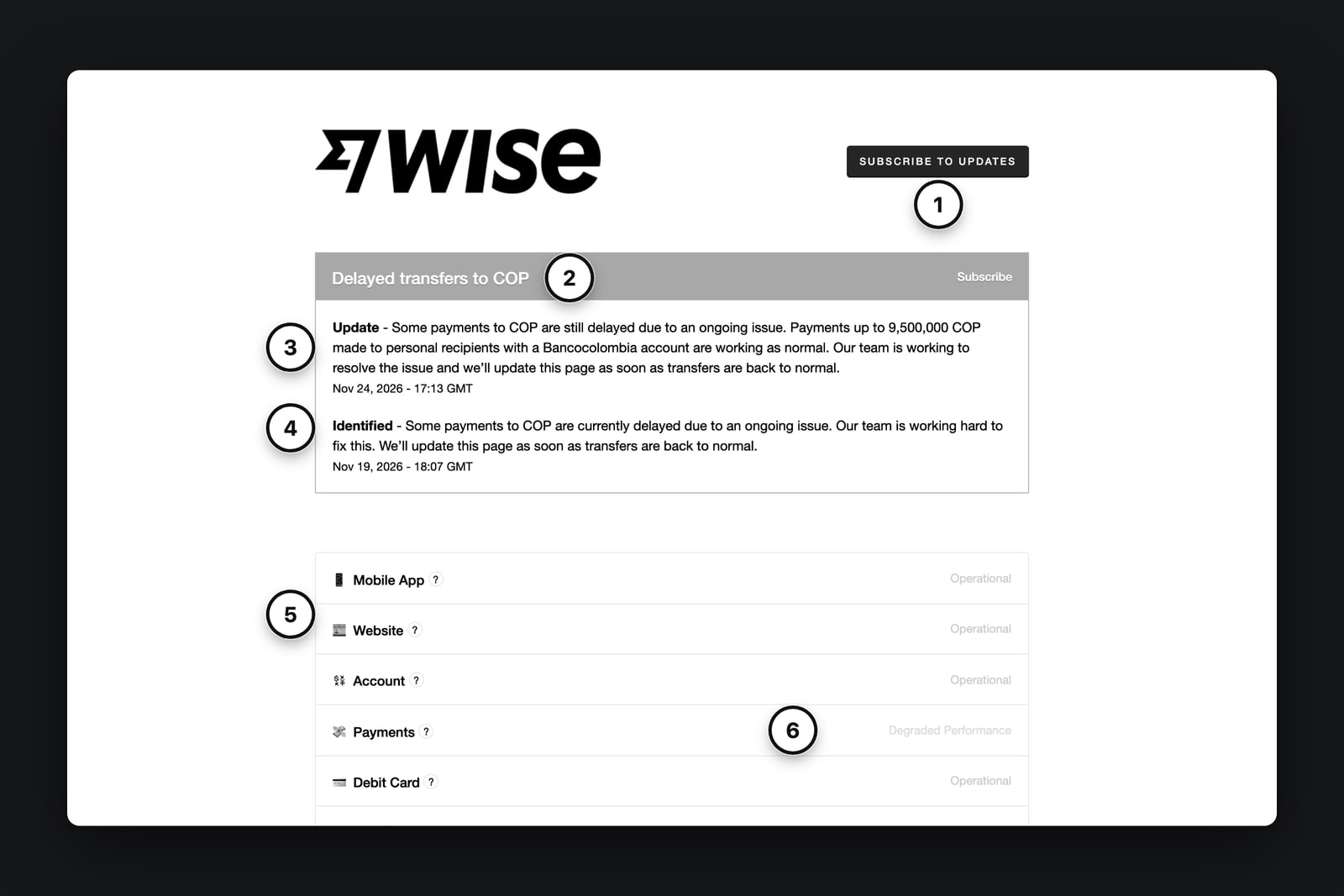
We read one real page tonight: status.wise.com, Wise's public status page, shot on 24 November 2026 at 23:20 GMT. It was carrying a live incident, "Delayed transfers to COP", open since 19 November. That is the best moment to read a status page: on a quiet day every page looks the same. What follows is six notes in the order the page shows them, three that work and three that a fintech team building its own page can do better. We read only the page and its public feed. Nothing here is a guess about Wise's systems or its team.
The page, in six notes
1. Subscribe to updates, before anything else
The only button in the header is "Subscribe to updates", top right, next to the logo. It opens five ways to be told: email, text message, Slack, a webhook and an RSS or Atom feed. This is the part that works hardest for a business customer. A company that pays suppliers through a transfer service does not want to refresh a page; it wants the incident to land in the channel where its finance team already works, or in its own system through the webhook. PagerDuty's status page guide recommends letting users subscribe by email, Slack or webhook. Wise offers all three and two more.
2. The title names the symptom and the corridor
"Delayed transfers to COP" is five words, and each one does work. "Delayed" says the money is slow, which is a different fear from "failed". "Transfers to COP" says which money: sends into Colombian pesos. A customer sending euros to Spain reads the banner and knows in one line that it is not about them. A title about the system, such as "Payments degraded", would have put every customer on alert.
3. The update says what still works
The newest update, dated 24 November at 17:13 GMT, carries the most useful sentence on the page: payments up to 9,500,000 COP to personal recipients with a Bancolombia account are working as normal. That is something the reader can act on. A freelancer waiting to pay family in Medellín now knows whether their transfer is likely to land. The update says what is broken and also draws the edge of the problem, with an amount, a type of recipient and a bank.
4. Two updates, five days apart, and no next time
The incident has two entries: "Identified" on 19 November at 18:07 GMT and an update on 24 November at 17:13 GMT. Both end on the same promise: "we'll update this page as soon as transfers are back to normal". Neither says when the next word will come. Atlassian, which makes the Statuspage tool this page runs on, recommends never going more than one hour without an update while customers are affected, and always saying when the next one is due. An hourly rhythm is not realistic for a problem with a partner bank that lasts days, and Wise may well have told affected customers in the app or by email; the page cannot show that. But a line such as "next update by 18:00 GMT tomorrow" costs one sentence, and it turns five quiet days into a promise kept every day.
5. The components are named after what customers do
Below the incident sit seven rows: Mobile App, Website, Account, Payments, Debit Card, API and Customer Support. Each has a small question mark that opens one plain line, such as "Sending, Receiving and Adding Money" for Payments or "Card Payments and Withdrawing Money" for the card. These are tasks a customer recognises, with no internal service names, no cluster IDs, no data centres. PagerDuty's guide puts it the same way: break services down from the user's side. For a money app this is the right instinct.
6. One row carries every currency, at a different weight than the banner
The Payments row reads "Degraded Performance". That row covers sending, receiving and adding money in every currency Wise handles, so tonight a customer sending dollars to Mexico sees their task marked degraded because of a problem with pesos to Colombia. And the page weighs the same problem twice. In Atlassian's definitions, degraded performance means a component works but is slow, while a partial outage means it is broken for a subset of customers. The page's public feed, summary.json, rates the incident's impact as major. On screen the banner is orange and the Payments row is the yellow of degraded performance. Both labels can be argued for; the reader should not have to do the arguing. Statuspage allows two levels of components through groups, so Payments could open onto its corridors or regions, and only the one in trouble would change.
What a fintech status page should carry, taken from this one
Put the six notes together and they make a short brief for a team building the page for a bank, a card program or a payments app:
- Subscription in every channel a business uses, with a webhook first among them, so a customer's own system can react.
- Incident titles that name the symptom and the scope: "Delayed transfers to COP", never "Payments degraded".
- Every update says what still works, with the amount, the rail or the bank that draws the edge.
- Every update names the next one, even when the answer is "tomorrow by 18:00 GMT".
- Components named after customer tasks, grouped down to the level where money actually moves: corridor, currency or payment rail.
- One weight per incident: the component status and the incident impact should tell the same story.
The same rule holds inside the product. An error state on a transfer screen says what happened and what the person can do next; a status page is that error state for everyone at once.
Why this is infrastructure work, and not only copy
Three of the six notes are decided before anyone writes a word. The subscription channels, the component tree and the link between a component and the monitor behind it are set up in the status tool and in the alerting that feeds it. Wise's page sits on its own subdomain, served by Atlassian's Statuspage rather than by the app, which is what PagerDuty's guide recommends so the page stays up when the product does not.
The feed matters as much as the page. The same data is published as JSON, which means a partner's treasury system, a monitoring service or an AI assistant asked "are Wise transfers to Colombia delayed?" can read it without a person in between. A component tree that stops at "Payments" gives every one of those readers the wrong answer for most customers. A tree that goes down to the corridor gives them the right one. For a fintech, granular components are less a design detail than an API decision.
And in the EU there is a legal floor under all of this. Since 17 January 2025 the Digital Operational Resilience Act requires financial entities to tell clients, without undue delay, about a major ICT-related incident that affects their financial interests, and about the measures taken. The rule does not name a status page, and how a given company meets it is a question for its compliance team. A page built along the six notes above is a good place for that message to live.
Sources
Frequently asked questions
Atlassian's incident guidance says never more than one hour without an update while customers are affected, and always say when the next one is due. For an incident that depends on a partner bank and lasts days, an hourly note with nothing new in it adds noise. A fixed daily time, written in every update, keeps the promise without inventing news. What matters most is that the next update arrives when the last one said it would.
Not as a flat list of dozens of rows: nobody scans 50 currencies to find their own. Statuspage and similar tools support component groups, so a Payments row can stay closed while everything works and open onto corridors, regions or rails when one of them has a problem. The useful test is whether a customer whose transfer is fine would see their task marked as affected. If they would, the tree stops one level too high.
No rule we know of names a status page. Since 17 January 2025, DORA Article 19(3) requires financial entities to inform clients without undue delay about a major ICT-related incident that affects their financial interests, and about the measures taken to limit it. A status page is one channel that can carry that message, beside email and in-app notices. Which channels satisfy the rule for a given company is a question for its compliance team or counsel.
Related articles
November 3, 2026 · 9 min read
April 21, 2026 · 8 min read
October 1, 2026 · 8 min read