Back to selected work
2026MokoDesign & Development

Moko: Customer Support Platform

Moko is a modern customer support workspace. We designed and built it end to end: a keyboard-first inbox, a ticket detail with macros and an AI summary, a customers CRM with the full profile, a knowledge base for agents and the public help centre, a reports dashboard with live charts, and a customer portal. Eight surfaces, one design system, one team.
SaaSWeb AppCustomer SupportDesign System
Moko: Customer Support Platform

Moko replaces the day-to-day surfaces a support team lives in. Inbox, ticket detail, customers, knowledge base, reports, macros, settings, and customer portal. The brief was to ship every surface at the same level of finish, with a design system that holds the whole product together and an interaction quality that does not collapse the moment the agent reaches for the keyboard.
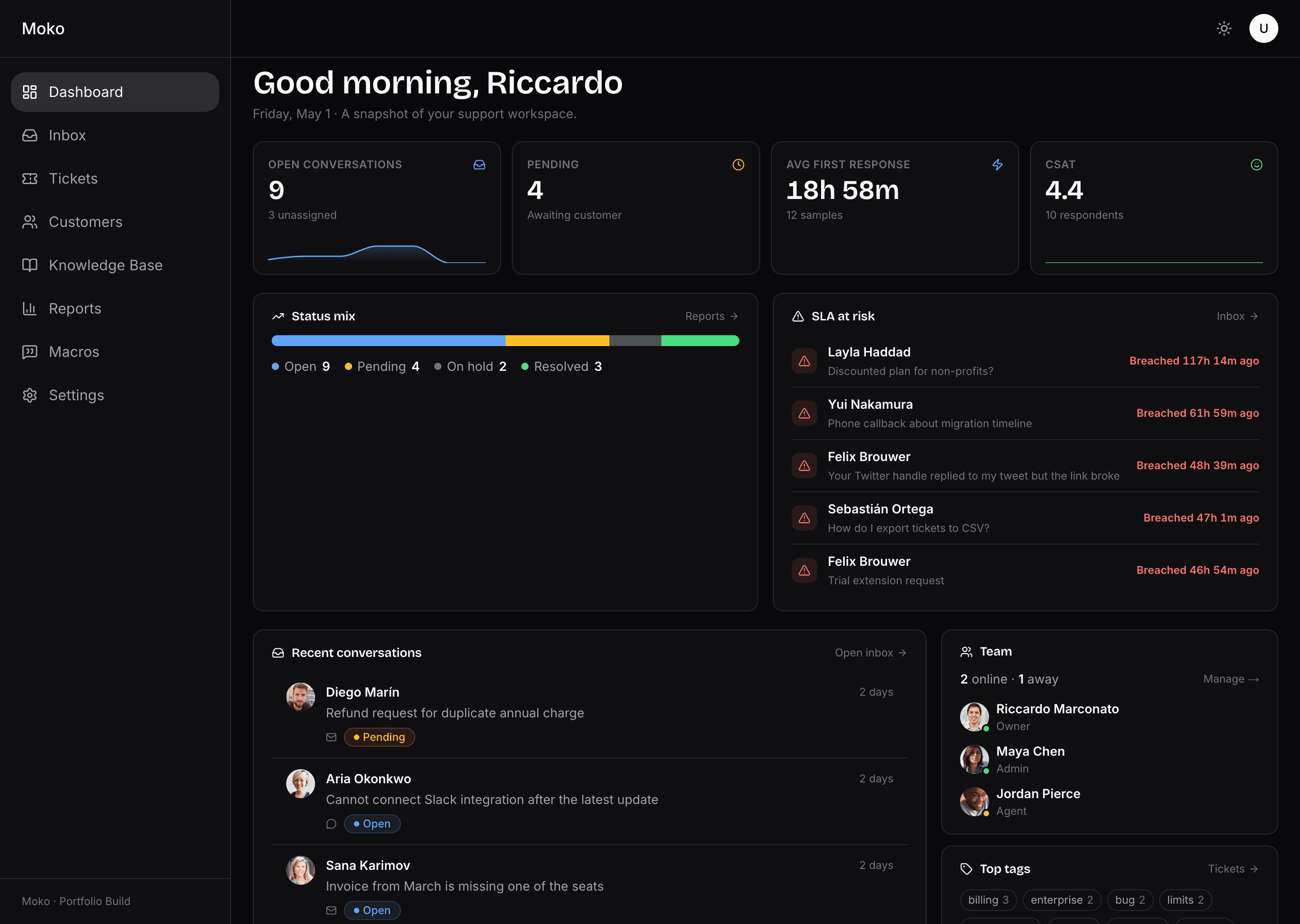
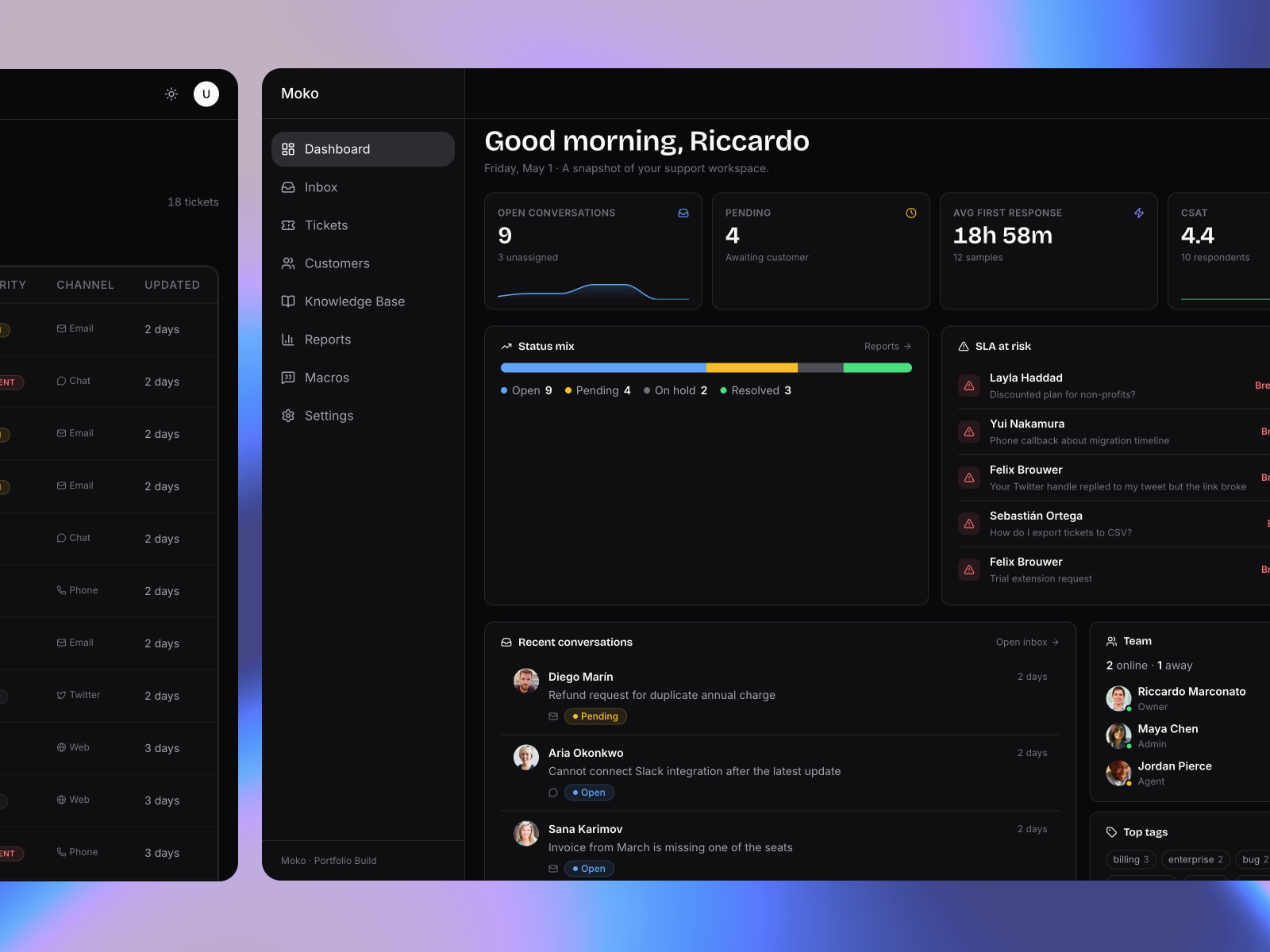
Moko dashboard, dark mode. KPI strip with open conversations, pending, average first response time, and CSAT. SLA-at-risk panel listing breached tickets. Recent conversations list. Team availability panel. Top tags strip.
Dashboard. Every shift opens here: KPIs, SLA breaches, recent activity, and team availability in one frame.
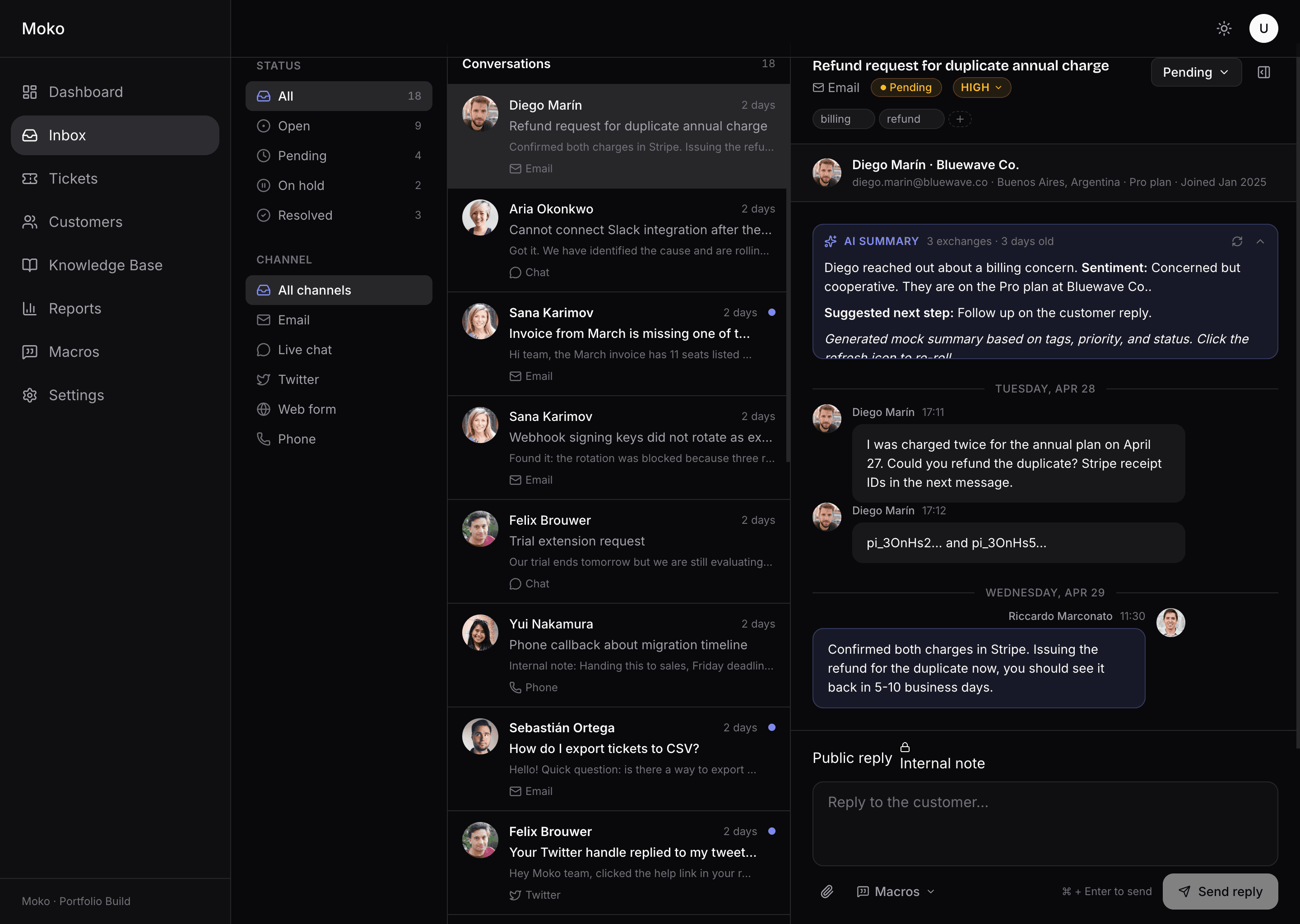
Moko inbox in dark mode, three-pane layout. Left pane has status counts and channel filters. Middle pane lists conversations with avatars, subjects, previews, and channel icons. Right pane shows the active thread with subject, status, priority, channel, customer strip, AI summary card, message bubbles, and a composer with public reply and internal note toggle.
Inbox. Three panes that share one keyboard. J and K move between conversations, R focuses the reply, E resolves and moves on, ? opens the cheatsheet.
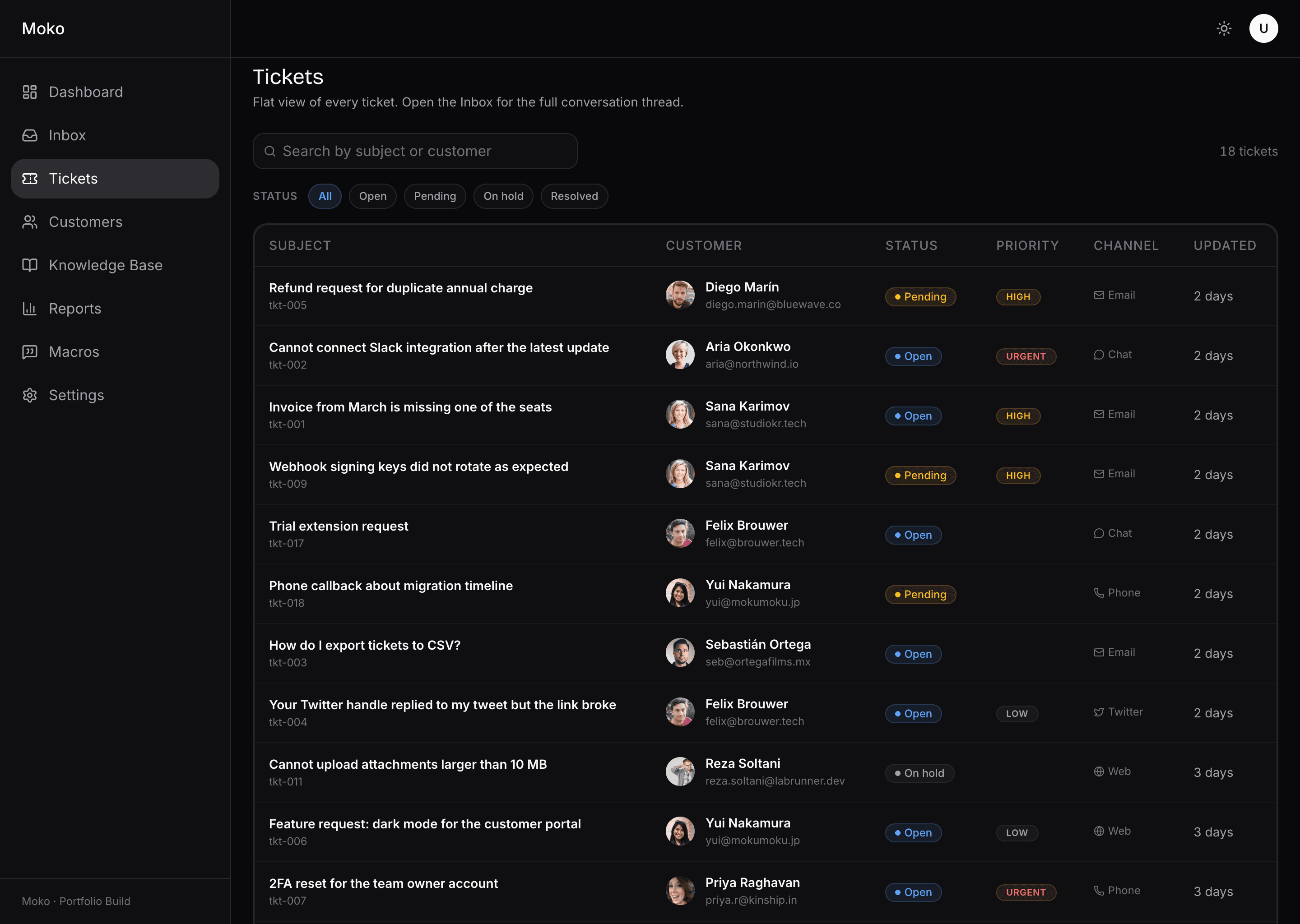
Moko tickets page in dark mode. Header with search field and status chip filter. Table with subject, customer, status badge, priority, channel, and updated time across eighteen rows.
Tickets. A flat table of every conversation, with the same status, priority, and channel vocabulary used across the app.

The inbox is the single most important page. The composer toggles between public reply and internal note with a colour change that makes the mode unambiguous before send. Status changes are optimistic with rollback. Tags and priority are edited inline, never in a dialog. An AI summary card sits above threads with three or more messages and surfaces sentiment, plan context, and a suggested next step. A one-click refresh re-rolls the suggestion when the agent wants a different angle.
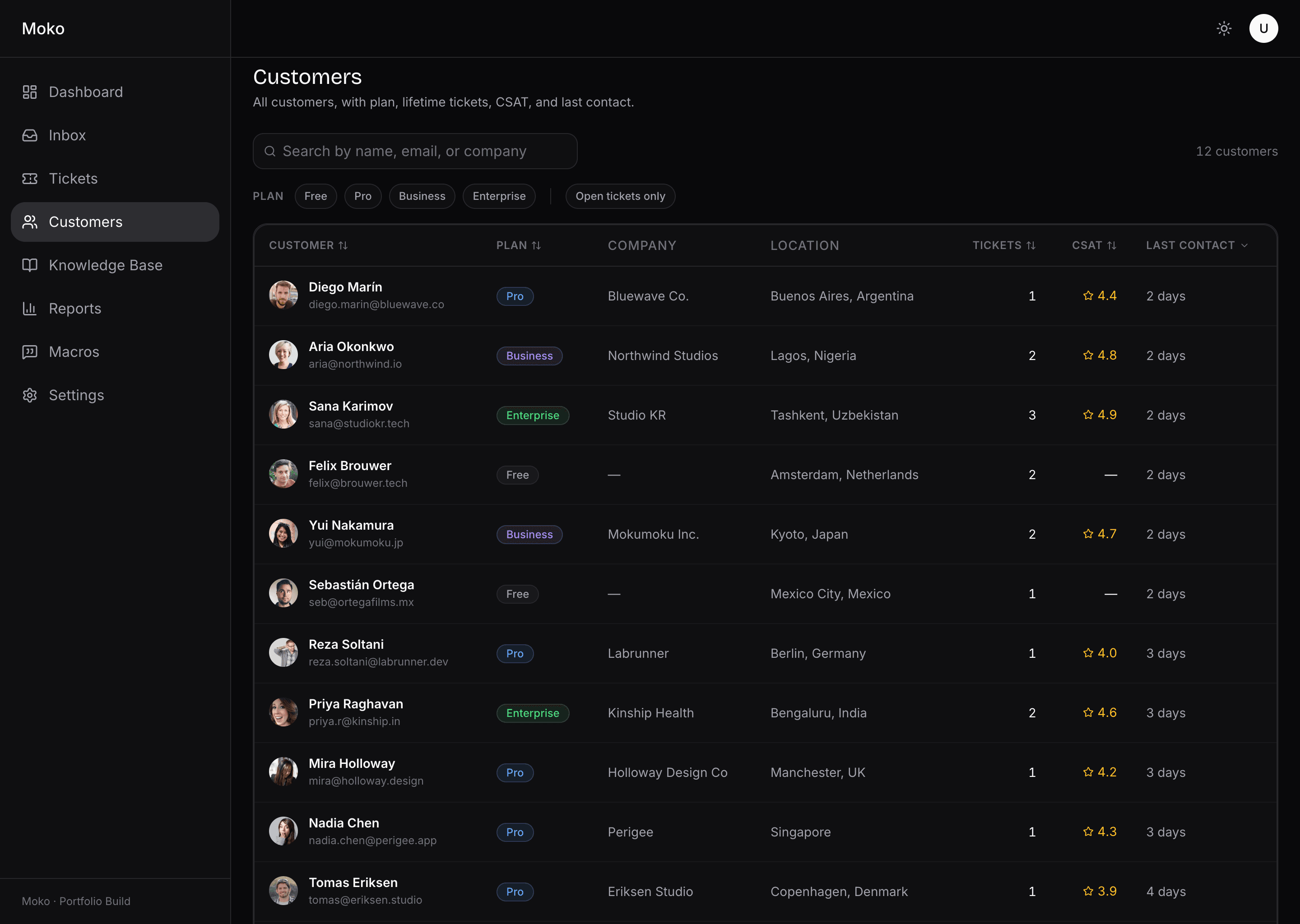
Moko customers page in dark mode. Search field, plan filter chips for Free, Pro, Business, Enterprise, and an open-tickets-only toggle. Table with avatar, name, email, plan badge, company, location, ticket count, CSAT, and last contact across twelve rows.
Customers. Plan, lifetime CSAT, last contact, with search and filter chips composed into a single query.
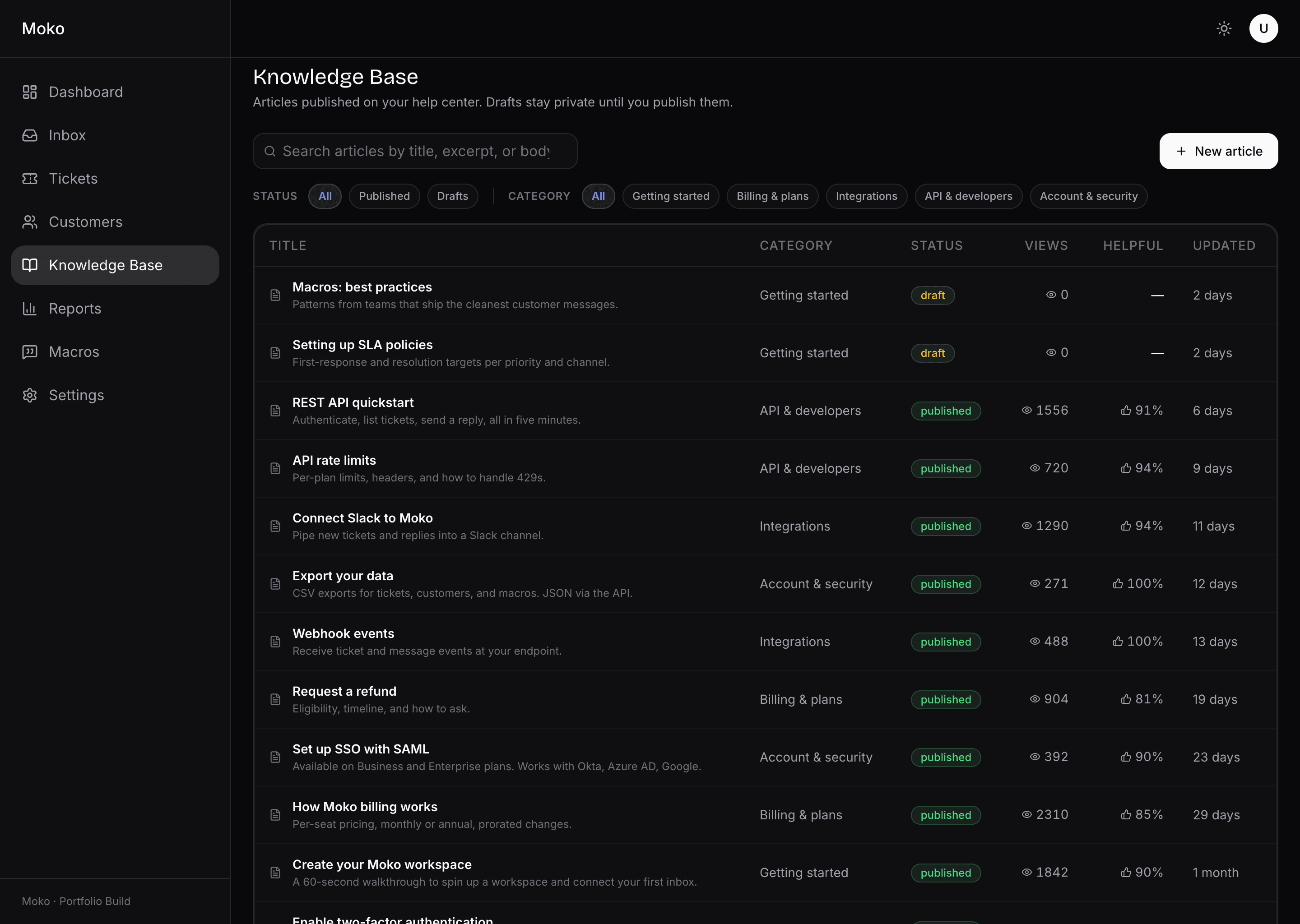
Moko knowledge base admin in dark mode. Header with search, status filter chips for Published and Drafts, and category filter chips. New article button. Table with title, category, status badge, view count, helpful percentage, and updated date.
Knowledge base, admin side. The same surface ships drafts and published articles. Click a row to open the editor.

Customers carry their own history with them. The 360 profile pairs a stats strip with the full ticket list and a custom-fields editor that adds, edits, and removes inline with optimistic feedback. The same shape powers the inbox drawer, so an agent who opens a conversation already sees the customer's plan, location, lifetime CSAT, and last few tickets without leaving the thread.

The knowledge base is two products in one. The admin is a CMS for support content with categories, drafts, and published states. The public side, served at /help, is a marketing-style layout with hero search, category cards, and per-article TOC. Both sides read from the same data.
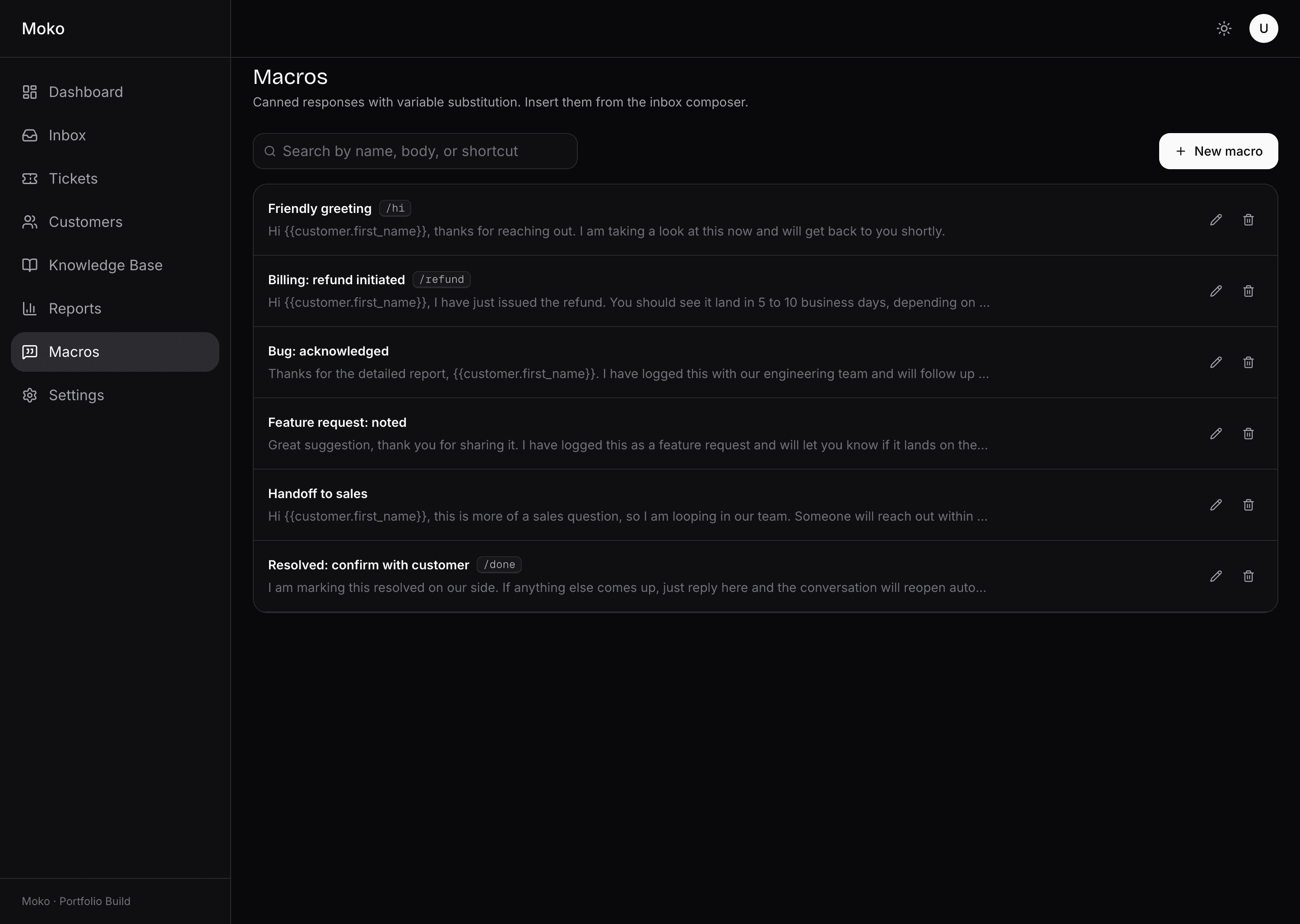
Moko macros page in dark mode. Search field and New macro button. List of six macros with shortcut tags such as /refund and /done. Each row shows an inline preview of the body, with edit and delete icons.
Macros. Canned responses with shortcut tags, inline preview, and one-click insertion from the inbox composer.
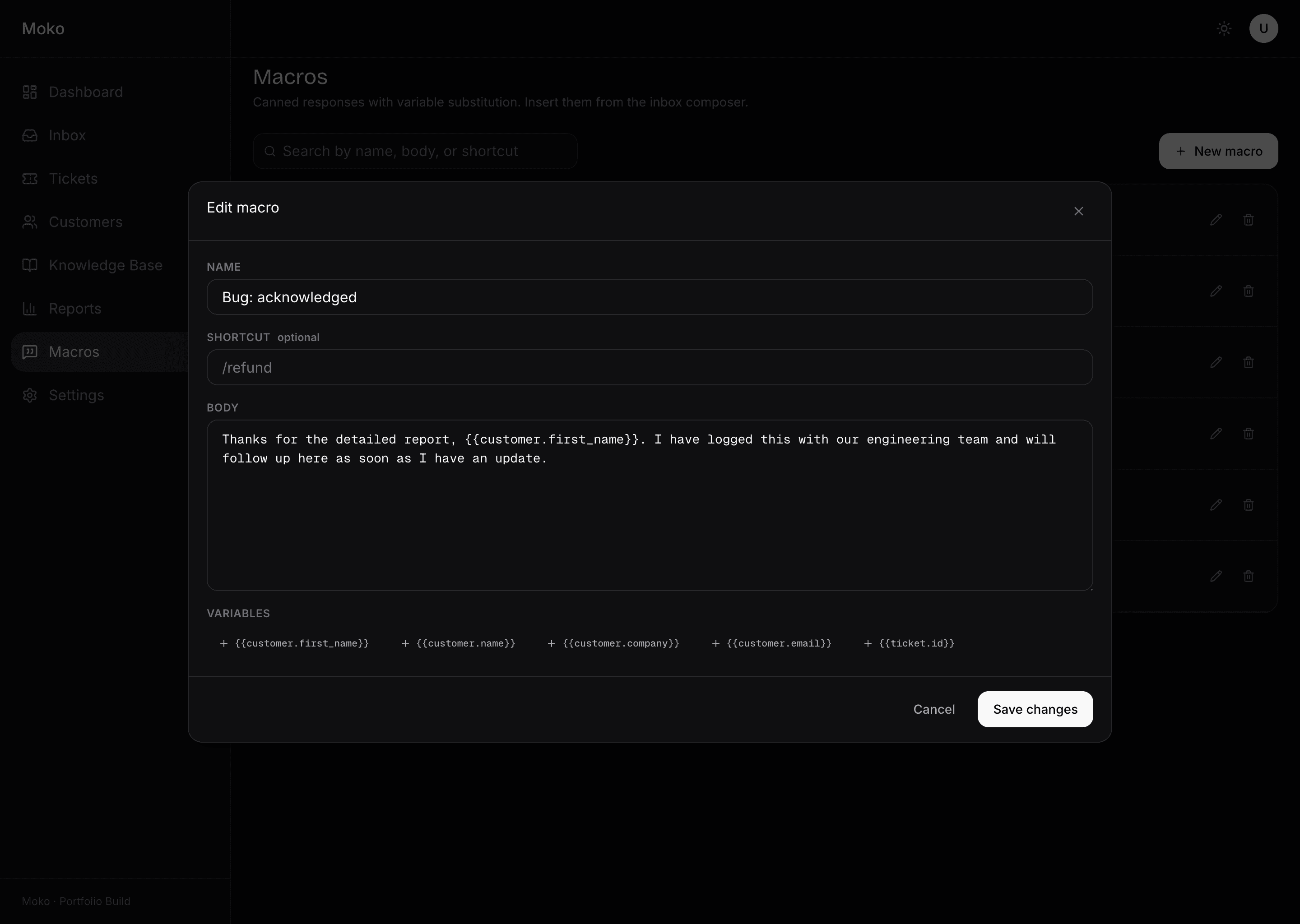
Moko macro edit modal. Form with name field, optional shortcut, body textarea, and a variable picker offering customer first name, customer name, customer company, customer email, and ticket id. Cancel and Save changes buttons.
Macro editor. Name, shortcut, body, and a variable picker that inserts placeholders the inbox composer expands at send time.

Macros are not a quick-reply menu, they are a lightweight templating system. Variables resolve from the live ticket and customer when the agent inserts the macro, so the same template feels written for the person on the other side. The combination of macros, the AI summary, and inline edits is what turns the inbox from a list into a workspace.
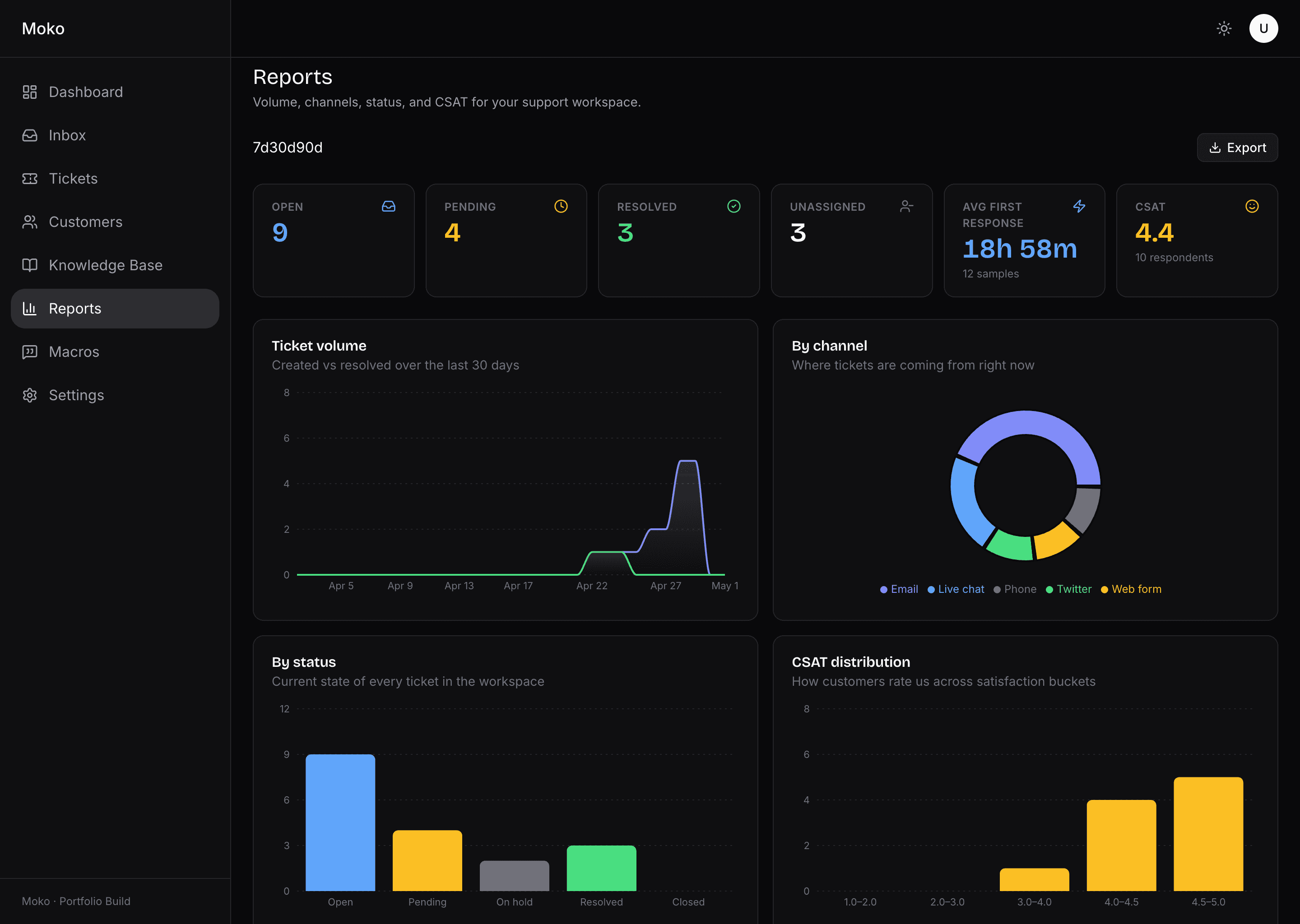
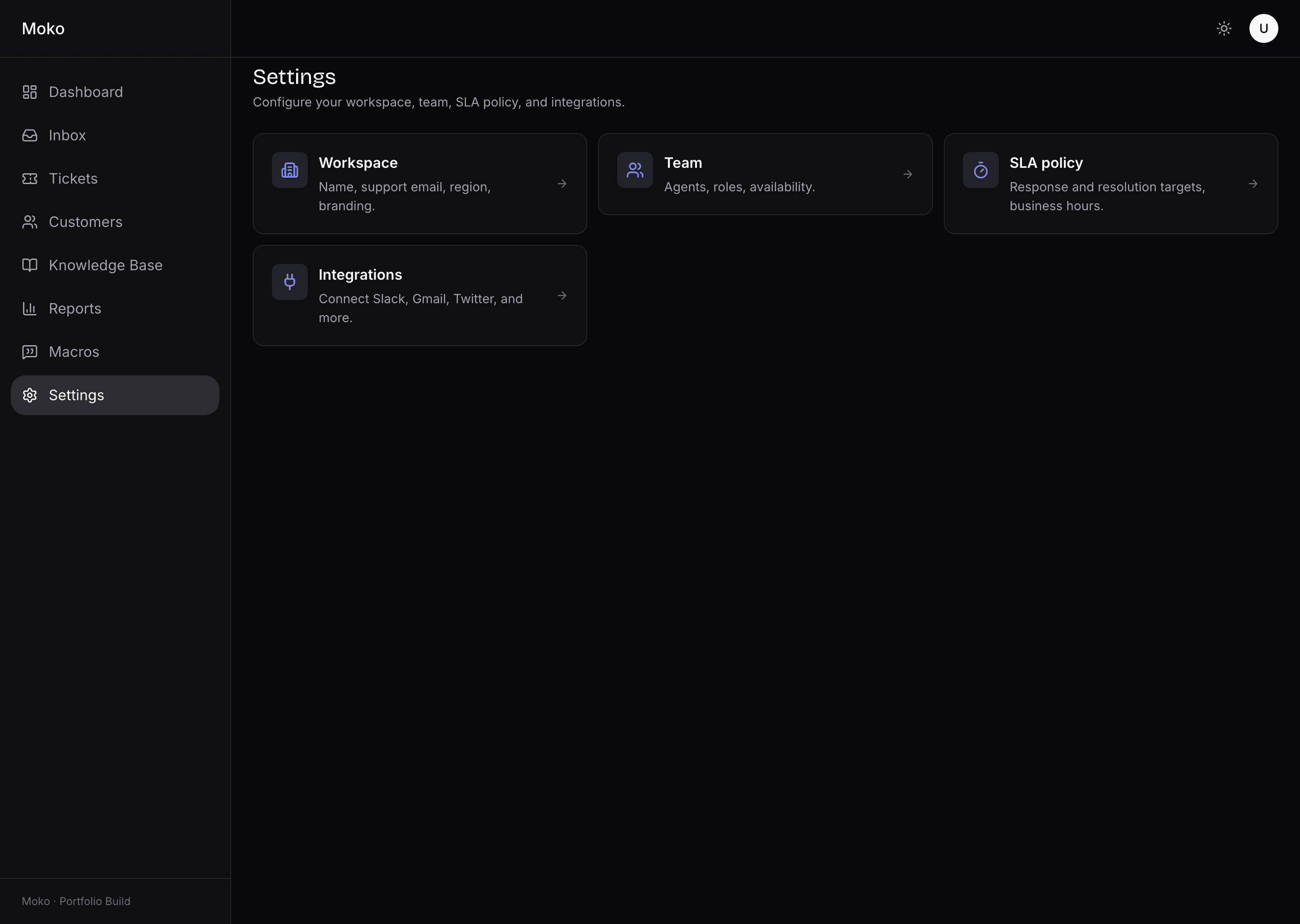
Moko reports page in light mode. Range selector showing 7d, 30d, 90d. KPI strip with open, pending, resolved, unassigned, average first response, and CSAT. Below: ticket volume area chart with two series, by-channel donut chart, by-status bar chart, and CSAT distribution bar chart.
Reports, light mode. Volume area, channel donut, status bars, CSAT distribution. Every chart pulls its colours from the design system, so the palette tracks the theme.
Moko settings hub in light mode. Four tile cards: Workspace (name, support email, region, branding), Team (agents, roles, availability), SLA policy (response and resolution targets, business hours), Integrations (Slack, Gmail, Twitter, and more).
Settings hub, light mode. Workspace, team, SLA policy, and integrations. Each tile opens its own surface.

Every surface ships in light and dark from the first commit. The whole product is token-driven: no hardcoded colour, no hardcoded font weight, no inline style. The design system carries the palette, the type scale, the radii, and the elevations across both themes. Charts and badges read from the same tokens as the buttons, so a theme switch never lies about what is interactive.

What the work delivered, in numbers and in posture.

By the numbers

  • 8Surfaces shipped end to endInbox, tickets, CRM, KB, reports, macros, settings, portal
  • 5Keyboard shortcutsPower-user inbox with help overlay
  • 4Chart typesAll tied to design system tokens
  • 0Hardcoded valuesEvery colour and style flows through tokens

Stack

  • Next.js16
  • React19
  • TypeScript
  • TanStack Query
  • recharts
  • react-markdown

Moko is the level we ship at.

If you are building a SaaS that needs the same care across every surface your customers and your team touch, that is the conversation we are after.

Start a conversation